
What’s the Real Difference Between Form 1099-SA and Form 5498-SA?
You opened a Health Savings Account to save on taxes. Smart move. Then tax season hits and two different HSA forms show up in your mailbox: the difference between 1099-sa and 5498-sa suddenly matters, because one reports what you spent and the other reports what you contributed. Get them confused, and you could end up reporting the same money twice or missing a deduction worth thousands.
Here’s the truth most HSA account holders miss: Form 1099-SA tracks distributions (money out), while Form 5498-SA tracks contributions (money in). They serve completely different purposes on your tax return, arrive at different times, and trigger different IRS reporting requirements. If you’re self-employed or running a solo business, understanding this distinction can save you from costly mistakes and unlock every dollar of tax savings your HSA offers.
Quick Answer
Form 1099-SA reports distributions you took from your Health Savings Account during the tax year. Form 5498-SA reports contributions made to your HSA during the same period. You’ll use the 1099-SA to prove qualified medical expenses on Form 8889, while the 5498-SA confirms your deduction eligibility. Both forms go to the IRS, but only the 1099-SA requires immediate action when filing your return.
Understanding Form 1099-SA: Your HSA Distribution Report
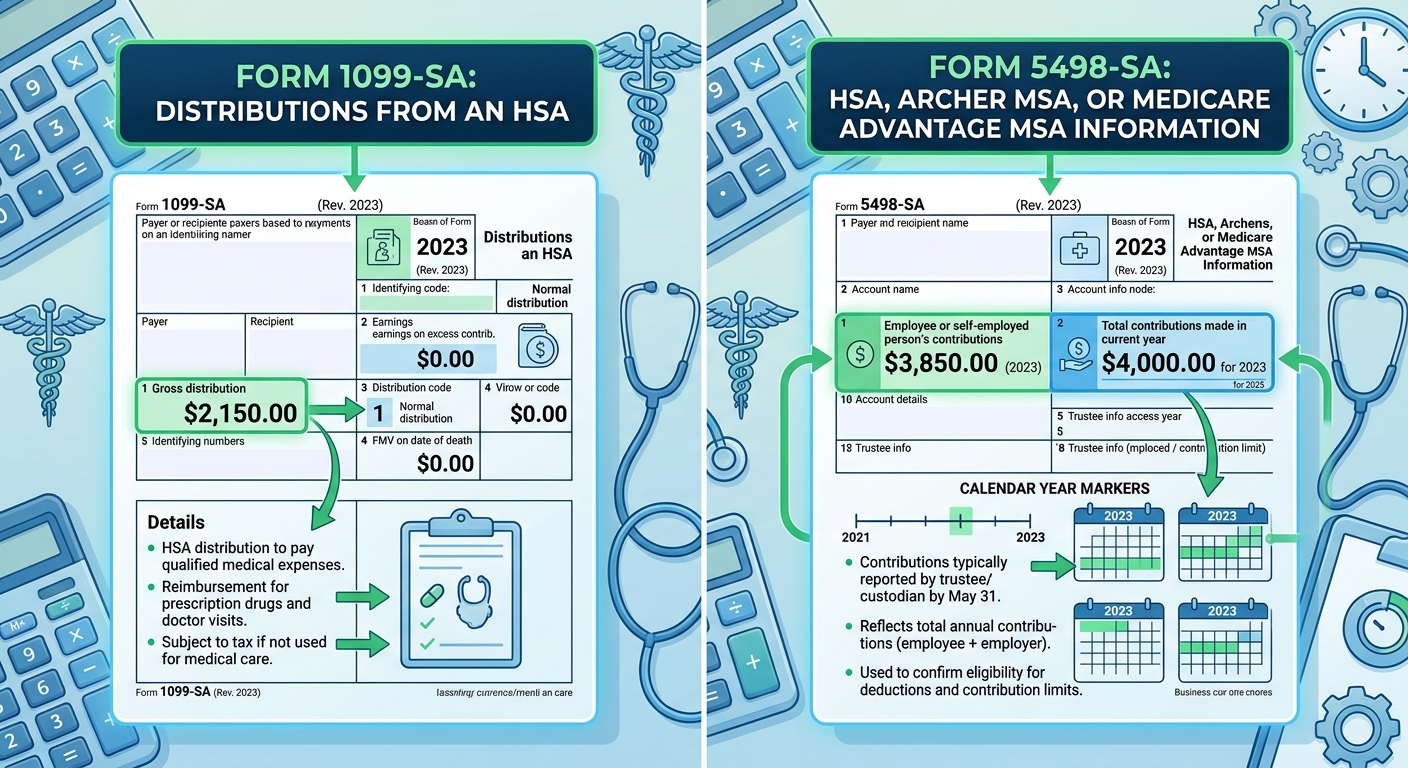
Form 1099-SA arrives in January or early February, right when you need it for tax filing. This form reports every dollar you withdrew from your HSA during the previous calendar year. Box 1 shows your total gross distribution. Box 3 identifies the distribution code, which tells the IRS whether you used the money for medical expenses, rolled it over, or took it for another reason.
Most self-employed taxpayers see Code 1 in Box 3, meaning a normal distribution. If you took money out for qualified medical expenses like doctor visits, prescriptions, or dental work, this code applies. The IRS doesn’t automatically assume your distribution was tax-free. You must prove it by reporting the withdrawal on Form 8889 and keeping receipts for at least three years.
What Each Box on Form 1099-SA Means
- Box 1 (Gross Distribution): Total amount withdrawn from your HSA in the tax year, including qualified and non-qualified expenses
- Box 2 (Earnings on Excess Contributions): Rarely filled out unless you over-contributed and withdrew the excess with earnings
- Box 3 (Distribution Code): Code 1 for normal distributions, Code 2 for excess contribution corrections, Code 3 for disability, Code 4 for death
- Box 4 (FMV on Date of Death): Only applies if the account holder died and you inherited the HSA
- Box 5 (HSA, Archer MSA, or MA MSA): Checkbox indicating which type of account this form covers
Here’s a real-world scenario: Maria, a freelance graphic designer, withdrew $4,200 from her HSA in 2025 to cover dental surgery and physical therapy. Her Form 1099-SA shows $4,200 in Box 1 and Code 1 in Box 3. She keeps all receipts and reports the distribution on Form 8889, Line 14a. Because her expenses were qualified, she owes zero tax on that $4,200. If she lost those receipts and couldn’t prove the medical purpose, the entire $4,200 becomes taxable income plus a 20% penalty ($840).
When Form 1099-SA Triggers Tax Consequences
Not every HSA distribution is tax-free. If you withdrew money for non-qualified expenses like groceries, gym memberships, or credit card bills, the IRS treats that distribution as ordinary income. You’ll pay your normal income tax rate on the withdrawal, plus a 20% additional tax if you’re under age 65.
The penalty disappears once you turn 65. At that point, HSA withdrawals for non-medical expenses are taxed like a traditional IRA distribution (ordinary income, no penalty). This makes your HSA a powerful backup retirement account if you max out contributions and never need the funds for healthcare.
Understanding Form 5498-SA: Your HSA Contribution Summary
Form 5498-SA arrives much later, usually in May, because HSA contributions for the prior tax year can be made up until the tax filing deadline (typically April 15). This form reports every contribution made to your HSA, including your own deposits, employer contributions, and any rollovers from other HSAs or Archer MSAs.
Box 2 shows your total contributions for the year. Box 3 breaks out the portion that represents the total contribution limit for your coverage type (self-only or family). If you’re self-employed and making your own contributions, every dollar in Box 2 potentially qualifies for an above-the-line deduction on Form 1040, Schedule 1, Line 13.
What Each Box on Form 5498-SA Means
- Box 1 (Employee or Self-Employed Person’s Contributions): Your personal contributions, not including employer deposits
- Box 2 (Total Contributions): All contributions from all sources during the year
- Box 3 (Total Contribution Limit): Maximum allowed based on your HDHP coverage type for the year
- Box 4 (Rollover Contributions): Money moved from another HSA or Archer MSA
- Box 5 (Fair Market Value): Total account balance as of December 31
Consider this example: Jake, a self-employed software consultant, contributed $4,150 to his HSA throughout 2025 (the 2025 limit for self-only coverage is $4,300). His employer doesn’t exist because he’s a solo freelancer, so Box 1 and Box 2 both show $4,150. Box 3 confirms his limit was $4,300, proving he stayed within the rules. He deducts the full $4,150 on his tax return, reducing his adjusted gross income and saving approximately $1,245 in federal taxes (assuming a 30% effective rate).
The Timing Issue That Confuses Everyone
Because Form 5498-SA arrives in May, it shows up after most people have already filed their taxes. You don’t need to wait for this form to claim your HSA deduction. Use your own contribution records, bank statements, and HSA account activity to calculate your deduction when filing in February, March, or April. The 5498-SA serves as confirmation, not a requirement for filing.
If you made a last-minute contribution in April 2026 for tax year 2025, that contribution appears on your 2025 Form 5498-SA even though the deposit happened in 2026. The IRS tracks contributions by the tax year they apply to, not the calendar year the money moved.
KDA Case Study: Self-Employed Consultant Corrects HSA Reporting Error
Derek, a 42-year-old self-employed marketing consultant earning $110,000 annually, came to KDA after receiving an IRS notice questioning his HSA deduction. He had contributed $7,750 to his family HSA in 2024 but only reported $4,850 on his tax return because he confused his Form 1099-SA distribution amount with his Form 5498-SA contribution total.
Our team identified the error immediately. Derek’s 1099-SA showed $4,850 in qualified medical distributions, but his 5498-SA confirmed $7,750 in total contributions. He had left $2,900 in legitimate deductions on the table. We filed an amended return, claiming the missing $2,900 deduction.
The result: Derek received a $1,015 refund (his marginal tax rate of 35% applied to the overlooked deduction). He paid KDA $850 for the amended return and consultation, netting a first-year benefit of $165 plus the peace of mind that his HSA reporting was now accurate. Moving forward, he saves an additional $2,712 annually by maxing out his HSA contributions with proper reporting.
Ready to see how we can help you? Explore more success stories on our case studies page to discover proven strategies that have saved our clients thousands in taxes.
Side-by-Side Comparison: Form 1099-SA vs Form 5498-SA
| Factor | Form 1099-SA | Form 5498-SA |
|---|---|---|
| What It Reports | Distributions (money out) | Contributions (money in) |
| When You Receive It | January or early February | May (after tax deadline) |
| Key Box to Check | Box 1 (Gross Distribution) | Box 2 (Total Contributions) |
| Where It Goes on Tax Return | Form 8889, Line 14a | Form 8889, Line 2 (or Schedule 1, Line 13) |
| Tax Implications | Potentially taxable if not for qualified expenses | Reduces taxable income via deduction |
| Penalty Risk | 20% penalty on non-qualified distributions (under age 65) | 6% excise tax on excess contributions |
Common Mistakes That Trigger IRS Scrutiny
Mistake #1: Reporting your 1099-SA distribution as additional income without using Form 8889. The IRS receives a copy of your 1099-SA. If you don’t file Form 8889 to explain the distribution, the IRS computer assumes the entire amount is taxable income and sends you a bill.
Mistake #2: Double-counting your HSA contributions. Some self-employed taxpayers see their contribution on Form 5498-SA and think they need to report it as income somewhere. Wrong. Contributions go straight to your deduction on Schedule 1. They never appear as income.
Mistake #3: Ignoring the fair market value in Box 5 of Form 5498-SA. This number tells you your account balance on December 31. If it’s growing year over year, you’re using your HSA correctly. If it’s shrinking or static, you might be over-withdrawing or under-contributing.
Mistake #4: Claiming a contribution deduction without an HDHP. You can only contribute to an HSA if you’re covered by a High Deductible Health Plan. If your insurance changed mid-year and you lost HDHP coverage, your contribution limit prorates. Form 5498-SA won’t catch this error. You must track it yourself or work with a tax advisor who understands self-employed tax planning strategies.
Red Flag Alert: Excess Contributions
Contributing more than the annual limit triggers a 6% excise tax on the excess amount. For 2025, the limits are $4,300 for self-only coverage and $8,550 for family coverage. If you’re 55 or older, add $1,000 as a catch-up contribution. The 6% penalty applies every year the excess remains in your account. Remove it quickly by withdrawing the excess plus any earnings before the tax deadline, and you avoid the penalty entirely.
How Self-Employed Taxpayers Should Use Both Forms
If you’re self-employed and contributing to your own HSA, you wear two hats: employee and employer. Unlike W-2 workers who get employer contributions automatically, you fund your entire HSA yourself. This means your Form 5498-SA Box 2 reflects your total out-of-pocket contribution, which flows directly to your tax deduction.
Your game plan:
- In January, review your Form 1099-SA. Add up every qualified medical expense you paid with HSA funds. Match that total to Box 1. If they align, you’re golden. If Box 1 is higher, you may have accidentally used HSA money for non-qualified expenses.
- Before filing your return, calculate your HSA contribution total. Don’t wait for Form 5498-SA. Check your HSA account portal, download transaction history, and add up deposits. This becomes your Line 2 entry on Form 8889.
- In May, when Form 5498-SA arrives, compare it to your filed return. If the numbers match, you’re done. If they don’t, determine whether you over-contributed, under-reported, or made a calculation error. File an amendment if needed.
- Keep both forms for at least three years. The IRS can audit HSA activity within this window. If you can’t produce proof of qualified expenses, they’ll reclassify your distributions as taxable.
California-Specific HSA Rules You Can’t Ignore
California doesn’t conform to federal HSA rules. The state treats HSA contributions as taxable income and HSA distributions for qualified medical expenses as non-taxable. This creates a mismatch. On your federal return, you deduct contributions and exclude qualified distributions. On your California return (Form 540), you add back the contribution deduction and subtract out the qualified distribution.
Practically, this means California taxes your HSA contributions in the year you make them but gives you a break when you spend the money on healthcare. It’s backwards from the federal treatment. Most tax software handles this automatically, but if you’re preparing your own return or working with an out-of-state preparer unfamiliar with California rules, errors happen frequently.
For more detailed guidance on managing California’s unique HSA requirements, see our self-employed tax planning guide for California.
Step-by-Step: How to Report HSA Forms on Your Tax Return
Step 1: Gather Your HSA Documents
Collect Form 1099-SA (if you took distributions), Form 5498-SA (when it arrives in May, or use your own records), and receipts for every medical expense you paid with HSA funds. Organize receipts by date and category: doctor visits, prescriptions, dental, vision, qualified over-the-counter items.
Step 2: Complete Form 8889, Part I (HSA Contributions)
Line 2 asks for your HSA contribution total. Enter the amount from Form 5498-SA Box 2, or if filing before May, enter your calculated total from bank records. Line 3 asks for your contribution limit based on coverage type. Check the IRS guidelines for your tax year. Line 9 gives you your HSA deduction, which flows to Schedule 1, Line 13.
Step 3: Complete Form 8889, Part II (HSA Distributions)
Line 14a asks for your total distributions from Form 1099-SA Box 1. Line 14b breaks out the portion you rolled over to another HSA (if any). Line 15 asks for qualified medical expenses. This is where your receipt total matters. If Line 15 equals or exceeds Line 14a, you owe no tax on the distribution. If Line 15 is less than Line 14a, the difference becomes taxable income on Line 16 and may trigger the 20% penalty on Line 17b.
Step 4: Transfer Results to Form 1040
Your HSA deduction from Form 8889, Line 9, goes to Schedule 1, Line 13. Any taxable distribution from Form 8889, Line 16, goes to Schedule 1, Line 8 as “Other Income.” The 20% additional tax, if applicable, goes to Schedule 2, Line 8.
Step 5: Adjust for California (If Applicable)
On California Form 540, Line 16 (Adjustments to Federal AGI), add back your HSA contribution deduction. On the line for subtractions, deduct your qualified medical distributions. This reverses the federal treatment and aligns with California’s non-conformity rules.
What Happens If You Ignore These Forms?
The IRS receives copies of both Form 1099-SA and Form 5498-SA directly from your HSA custodian. If you don’t file Form 8889 or misreport the amounts, the IRS Automated Underreporter (AUR) system flags your return. You’ll receive a CP2000 notice proposing additional tax, penalties, and interest.
Here’s what the notice looks like in practice: The IRS sees your 1099-SA showing a $3,000 distribution. You didn’t file Form 8889. The IRS assumes the entire $3,000 is taxable income and adds it to your return. If you’re in the 24% tax bracket, that’s $720 in tax plus a 20% penalty ($600) plus interest. Total bill: $1,320 or more.
Responding to the CP2000 requires you to prove the distribution was for qualified medical expenses. You’ll need receipts, an explanation letter, and a corrected Form 8889. If you can’t provide documentation, you’re stuck with the bill. This is why keeping records for at least three years is non-negotiable.
Ready to Reduce Your Tax Bill?
KDA Inc. specializes in strategic tax planning for business owners, S Corps, LLCs, and high-net-worth individuals. Book a personalized consultation and walk away with a clear plan.
Frequently Asked Questions
Do I Need Both Forms to File My Tax Return?
You need Form 1099-SA if you took any distributions during the year. You don’t technically need Form 5498-SA to file because it arrives after the deadline, but you must accurately report your contributions using your own records. If you didn’t take distributions, you won’t receive a 1099-SA, and you can file your return with just Form 8889 showing contributions.
What If My Form 1099-SA Amount Doesn’t Match My Receipts?
This happens when you withdrew HSA funds for non-qualified expenses or when you paid for medical care but didn’t keep receipts. If the 1099-SA is higher than your documented qualified expenses, the difference is taxable. Review every transaction in your HSA account to identify non-qualified withdrawals. If you genuinely used the money for healthcare but lost receipts, consider whether you can reconstruct proof through medical provider statements or credit card records.
Can I Contribute to My HSA After December 31 and Still Deduct It for the Prior Year?
Yes. The HSA contribution deadline matches the tax filing deadline, typically April 15. A contribution made in January, February, March, or April 2026 can be designated for tax year 2025 as long as you specify this with your HSA custodian. The contribution will appear on your 2025 Form 5498-SA even though the money moved in 2026.
What Should I Do If I Over-Contributed?
Contact your HSA custodian immediately and request a return of excess contribution. They’ll calculate any earnings on the excess and withdraw both amounts before the tax deadline. You’ll receive a corrected Form 1099-SA showing the excess distribution with Code 2 in Box 3. This avoids the 6% excise tax. If you miss the deadline, you’ll owe 6% on the excess every year it remains in the account.
Book Your HSA Tax Strategy Session
Confused about how your HSA forms affect your tax return? Wondering if you’re maximizing every deduction or accidentally triggering penalties? Let’s fix that. Our team specializes in helping self-employed professionals and 1099 contractors navigate HSA reporting, contribution limits, and California’s non-conformity rules. Book a personalized consultation with our strategy team and get clear, compliant, and confident. Click here to book your consultation now.
This information is current as of 5/3/2026. Tax laws change frequently. Verify updates with the IRS or a qualified tax professional if reading this later.